Some links in this post are affiliate links. If you sign up through them, CentsForward may earn a small commission at no extra cost to you. Read the full affiliate disclosure.
Your account is approved, the money has landed, and now you are staring at a screen full of tickers and tabs. Your finger hovers over the buy button, and somehow it feels like the most expensive click you will ever make.
That nervous pause is normal, and it is also fixable. This guide shows you exactly how to buy an ETF on Interactive Brokers, one screen at a time, so your first order feels like a routine task instead of a gamble.
Quick answer: To buy an ETF on Interactive Brokers, fund your account, switch on trading permissions for the exchange where the ETF is listed, search for the fund by its ISIN, check the listing currency, enter a limit order for the number of shares you want, review the commission, and confirm. Then repeat on a schedule. The whole process takes about ten minutes once your account is funded.
Why the First Purchase Feels So Scary
Most people who stall at this point do not lack knowledge. They are dealing with loss aversion, the tendency to feel a possible loss roughly twice as strongly as an equal gain. Pressing buy turns an abstract plan into real money that can go down.
The fix is not to feel braver. It is to decide in advance, so that on the day you only follow your own instructions. Psychologists call this an implementation intention, a plan that says exactly what you will do, when and where. Write down your fund, your amount and your date before you open the app.
Before You Buy an ETF on Interactive Brokers: 3 Things to Have Ready
- A funded, approved account. If you have not opened one yet, follow my guide to opening an Interactive Brokers account from abroad. You can start your Interactive Brokers application here, and it includes the W-8BEN form that tells the US you are not an American taxpayer.
- A fund chosen on paper. Know which ETF you want and why. If you are still deciding, read about UCITS ETFs for non-US investors and my list of halal ETFs for non-US investors. New to investing from abroad? Start with our expat investing guide.
- An amount you can leave alone. Money you may need within a few years belongs in your emergency fund, not in the market.
How to Buy an ETF on Interactive Brokers: 7 Steps
Menu names can change slightly as Interactive Brokers updates its platform, but the order of the steps to buy an ETF on Interactive Brokers stays the same.
Step 1: Fund your account
Deposit money by bank transfer from the Client Portal. Send it in US dollars if your bank allows it, because converting currency twice quietly costs more than most fees you will see on the platform. Transfers can take a few working days, so fund the account before you plan to invest.
Step 2: Enable trading permissions for the exchange
Most UCITS ETFs that non-US investors use are listed on the London Stock Exchange. In the Client Portal, open your settings, find Trading Permissions, and make sure stocks and ETFs on the exchange you need are switched on. If an ETF later shows as unavailable, this is the first place to check.
Step 3: Find the ETF by its ISIN
An ISIN is a 12-character code that identifies one specific fund anywhere in the world. Searching by ISIN is safer than searching by name because many funds have similar names and several share classes. For example, the iShares MSCI World Islamic UCITS ETF has the ISIN IE00B27YCN58, which I use here only to show the format, not as a recommendation.
Step 4: Check the listing currency and the price gap
The same fund can trade on several exchanges and in several currencies. Choose the line that matches the currency you hold, so you do not pay for a conversion on top of the purchase.
Then look at the bid-ask spread, the gap between the highest price a buyer offers and the lowest price a seller accepts. A tight spread means you are paying close to the fair price. Spreads are often wider in the first minutes after the market opens, so placing your order a little later in the session can help.
Step 5: Place a limit order
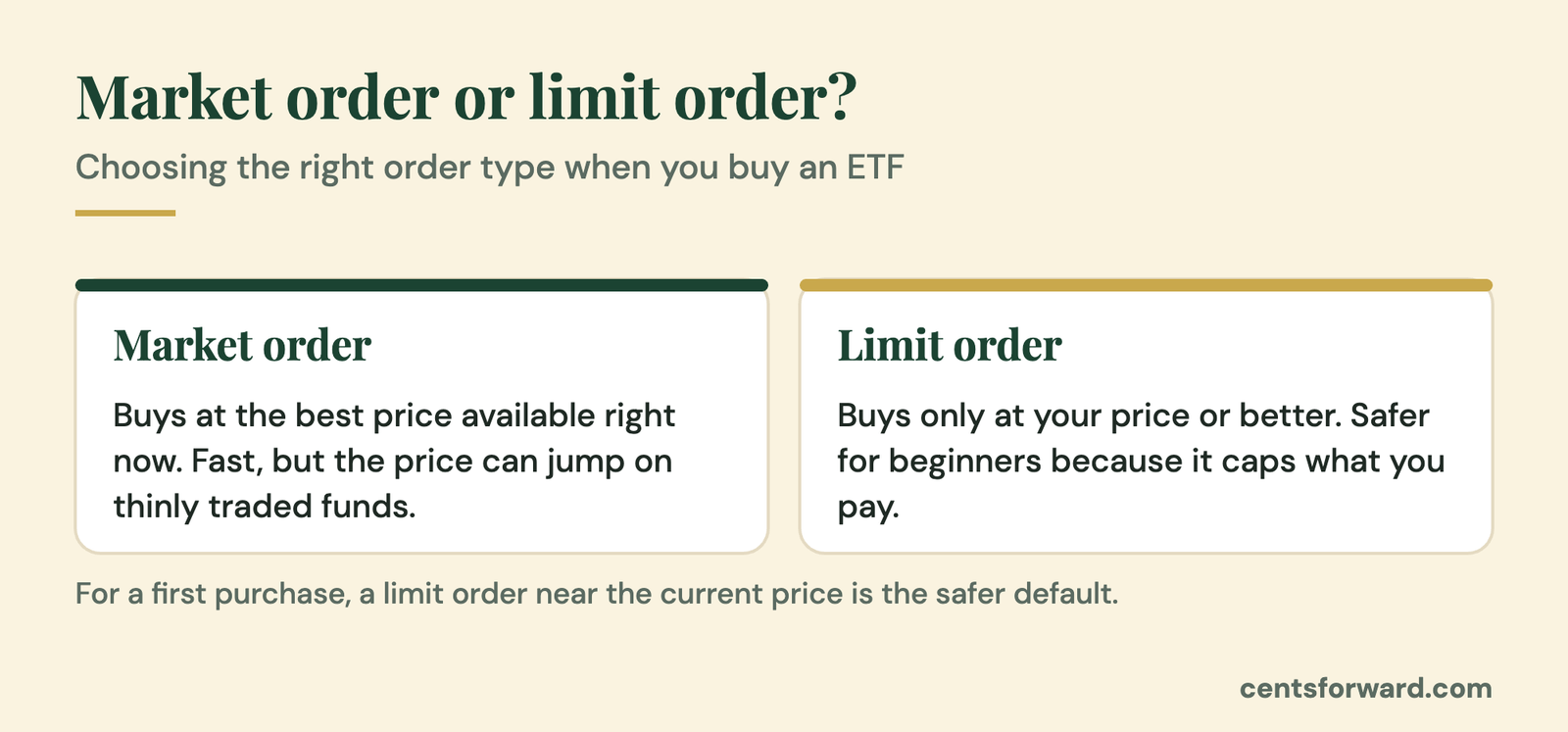
A market order buys at whatever price is available right now. A limit order says you will pay no more than a price you set. For a beginner, a limit order near the current price protects you from an unexpected jump, especially in funds that trade less often.
Enter the number of shares, not the dollar amount. Divide your budget by the current price and round down. If you plan to invest $500 and the fund trades near $50 a share, that is 10 shares.
Step 6: Review the commission and confirm
Before you submit, Interactive Brokers shows an order preview with the estimated commission. Read it every time until it feels boring. When the numbers match your plan, confirm the order and check the Orders and Portfolio pages to see it filled.
Step 7: Repeat on a schedule
One order to buy an ETF on Interactive Brokers does not build wealth. Pick a date each month, such as the day after payday, and treat the purchase as a bill you pay to your future self. Some products on the platform support automatic recurring investments, but availability depends on the fund and exchange, so a calendar reminder is a perfectly good backup.
The Small-Order Trap When You Buy an ETF on Interactive Brokers
Interactive Brokers charges a commission on each order, and on small orders a fixed minimum can take a noticeable share of your money. Look at the commission schedule for the exchange you use, then do a quick check: divide the commission by the order value.
If a $100 order costs a few dollars to place, that is a heavy tax on your habit. In that case, buy less often with a larger amount, for example once a quarter instead of every month. Cost per purchase matters more than the exact timing, as long as you keep going.

Halal Settings to Check Before You Buy an ETF on Interactive Brokers
A Shariah-screened fund only solves part of the picture, because how you hold it matters too. These habits keep your account structure clean:
- Use a cash account. Do not borrow to invest. Margin loans charge interest, which is why most scholars advise against them.
- Do not opt in to share lending. Interactive Brokers offers a stock yield enhancement program that lends out your shares for extra income. It is optional, and you can simply leave it off.
- Handle idle-cash interest carefully. Some accounts pay interest on uninvested cash. Many scholars suggest giving that amount to charity, so ask a scholar you trust about the method that suits your situation.
Not sure which funds fit these standards? My guide to halal ETFs for non-US investors compares three UCITS options.
4 Mistakes to Avoid When You Buy an ETF on Interactive Brokers
- Buying the wrong share class. Always match the ISIN, not just the name.
- Using a market order on a thinly traded fund. Use a limit order and a sensible price.
- Waiting for a dip. Trying to time the market usually means sitting in cash while prices move without you.
- Checking the price daily. Looking every morning turns normal ups and downs into stress. Check monthly.
If you are still choosing a platform, compare your options in my guide to the best brokers for non-US investors. Prefer a simpler app? eToro also accepts non-US residents and offers an Islamic account option. For the tax side, read do expats pay tax on investments, and keep the IRS explanation of Form W-8BEN handy if the broker asks you to renew it.
Want a full checklist before you invest? Use my beginner investing checklist.
Frequently Asked Questions
How do I buy an ETF on Interactive Brokers for the first time?
Fund your account, enable trading permissions for the exchange, search for the ETF by its ISIN, choose the right currency listing, place a limit order for a set number of shares, review the commission, and confirm. Check the Portfolio page afterwards to see the filled order.
How much money do I need to buy an ETF on Interactive Brokers?
To buy an ETF on Interactive Brokers, you need enough for at least one share plus the commission. Many ETFs trade between $30 and $150 a share, but check the price of your chosen fund, because commissions can make very small orders poor value.
Can UAE residents buy London-listed ETFs on Interactive Brokers?
Yes. Interactive Brokers accepts UAE residents and gives access to London-listed UCITS ETFs once the right trading permissions are on. Availability can change, so confirm in your account before you plan a purchase.
Should I use a market order or a limit order?
When you buy an ETF on Interactive Brokers, a limit order is safer for most beginners because it caps the price you pay. A market order is faster but can fill at a worse price when the spread is wide or the fund trades infrequently.
Is Interactive Brokers halal?
The platform offers many products, so halal compliance depends on what you buy and how you use the account. Sticking to a cash account, avoiding margin and share lending, and holding Shariah-screened funds addresses the main concerns, but confirm with a scholar you trust.
The Bottom Line
To buy an ETF on Interactive Brokers, you only need seven small steps and one decision made in advance. The click will always feel a little loud the first time, and that is fine.
Write down your fund, your amount and your date today, and buy an ETF on Interactive Brokers this week. Want one practical investing tip for non-Americans every week? Join the free CentsForward newsletter.
This article is for education only and is not financial, religious or tax advice. Platform menus, fees and product availability change, so check Interactive Brokers’ current information and consult a qualified professional and a scholar you trust before investing.
Keep reading
Halal ETFs: 3 Best UCITS Picks for Non-US Investors
Looking for halal ETFs outside the US? Compare 3 Irish-domiciled UCITS picks, their fees and screening, and learn how to choose one with confidence.
Do Expats Pay Tax on Investments? 7 Essential Facts to Avoid Costly Mistakes
Do expats pay tax on investments? Here is how residency, US withholding and estate tax really work for non-Americans, and how to keep more of your returns.
Accumulating vs Distributing ETFs: Best Halal Pick 2026
Disclosure: some links in this post are referral links. If you open an account through them, CentsForward may earn a commission at no extra cost to...
[…] step: once your account is funded, follow this guide on how to buy an ETF on Interactive Brokers, or pick a fund from the best halal ETFs for non-US […]
[…] chose IBKR? Here is how to buy an ETF on Interactive Brokers, step by step. Received a lump sum from your employer? Read how to invest your end of service […]
[…] Keep reading: how to build wealth as an expat, how to invest your end of service gratuity and how to buy an ETF on Interactive Brokers. […]